Quick summary:
- Yes, you can! ✅
- I used a Series 7 GPS, however anything going back to the Series 4 will work (excluding the SE)
- Breakdown by leads:
- Limb leads (I, II, III) all can be recorded easily ✅
- Augmented leads (aVL, aVR, aVF) can still be measured by the Apple Watch but they require an extra step – this step involves using a wire and I did not go through the trouble of it (steps to accomplish this can be seen in this professor’s article)
- Precordial leads (V1-V6) can be successfully approximated and multiple methods will work ✅
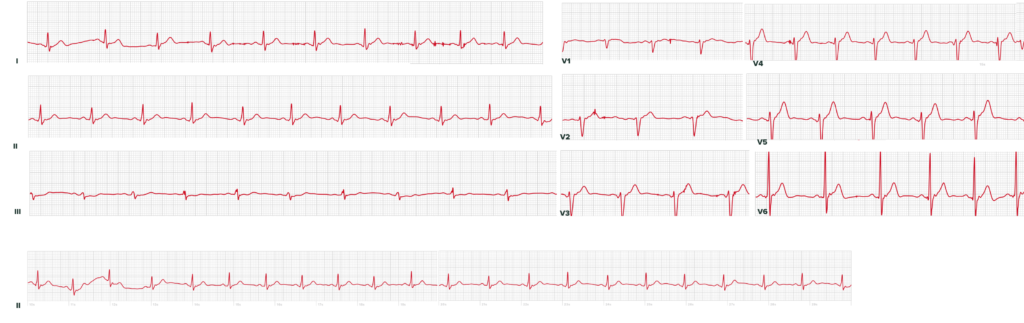
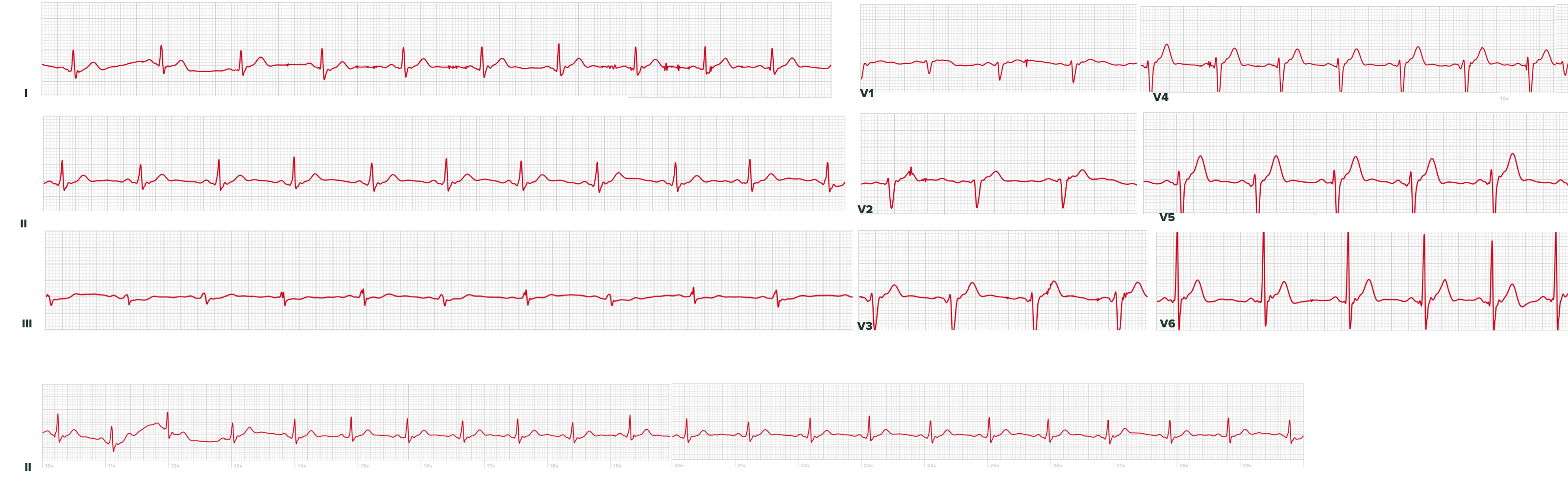
- Below is an image of an ECG I made from my own heart, following the methods characterized in this article:
- At the bottom of the article I include an actual heart attack as measured by an Apple Watch (compared to the patient’s professional ECG)
Overview:
The art of using a 1-lead device (or 2-electrode device) to record all 12 ECG leads is not new – in 2008, Dr. Grier at NDSU outlined the framework for doing this with handheld devices, far before smart watches even hit the market. However, unlike those 16 year old devices and even new home ECG readers (e.g., Kardia’s products), Apple Watches offer a ubiquity that makes them interesting for this purpose if chest pain strikes in a location with forcibly delayed healthcare access (skiing, hiking, airplanes).
Measuring I, II, III, aVL, aVF, aVR:
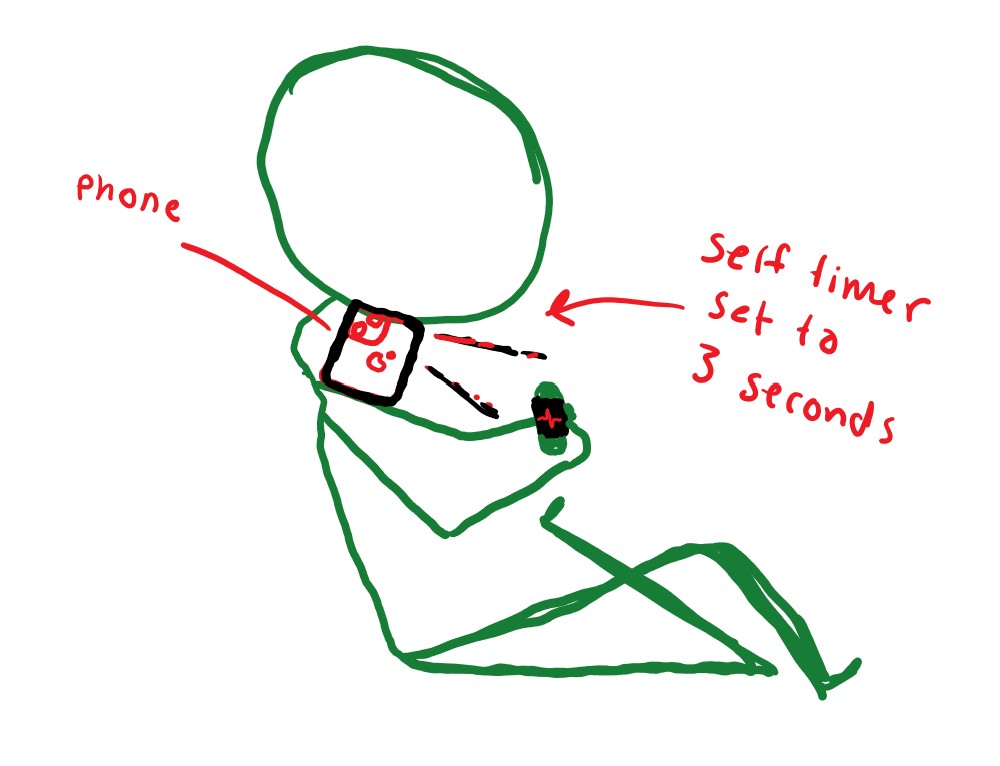
Leads I, II, and III can be easily measured on the Apple Watch. The watch uses its back crystal as the positive electrode and the crown as the negative electrode. Below is a sketch of how Lead I can be measured. Leads II and II can be similarly measured.
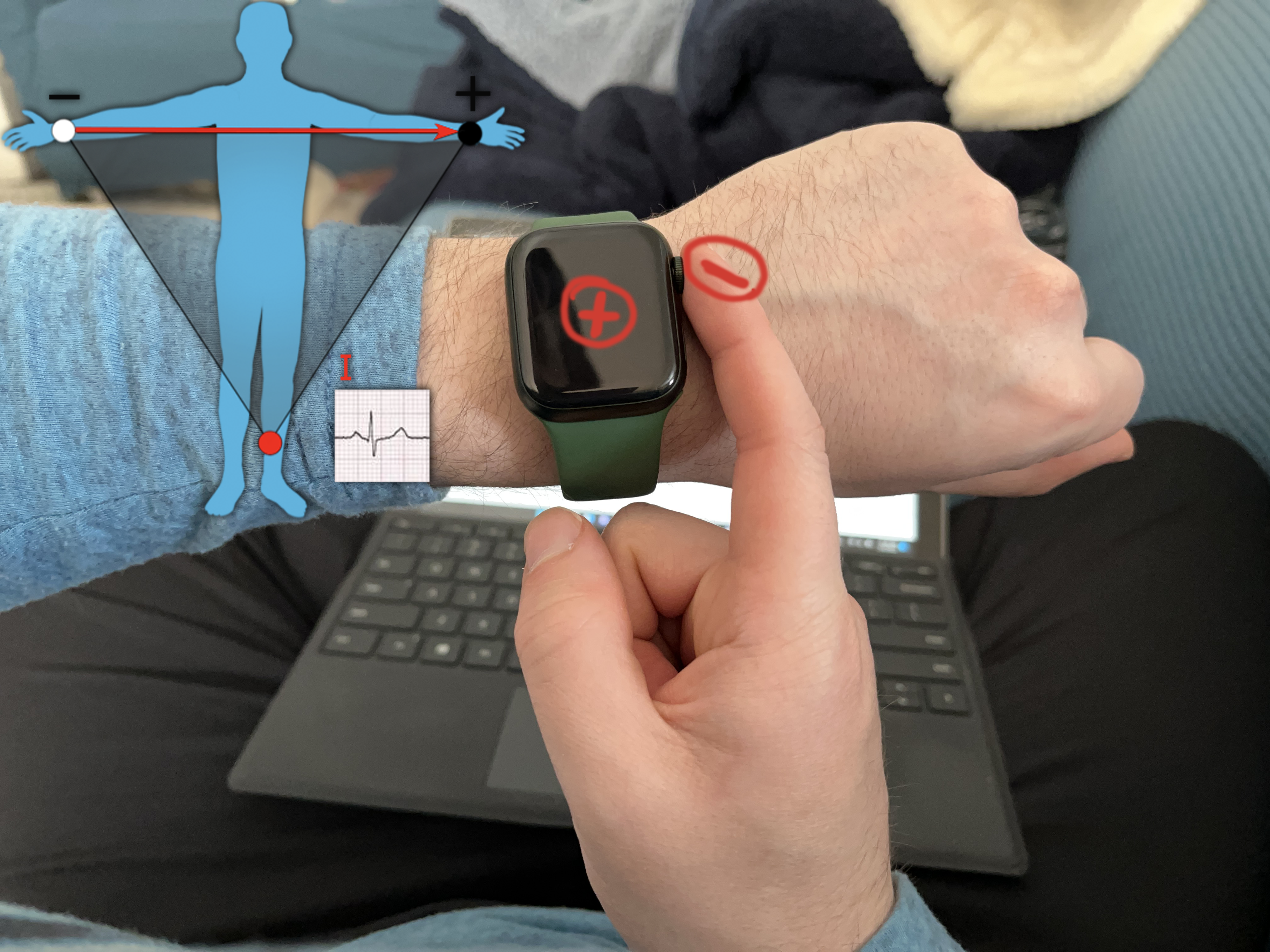
- Lead I: Watch on left wrist, right finger on crown
- Lead II: Watch on lower abdomen, right finger on crown
- Lead III: Watch on lower abdomen, left finger on crown
- Augmented leads (if desired): try this website from Dr. Grier, or this guide
The augmented leads are a bit more complicated. Unlike the other leads which are largely just the potential difference between two different points on our body, the augmented leads are calculated. Their calculation averages two locations and then uses the actual potential from another location – the same professor mentioned above, Dr. Grier, has a very nice graphic that explains it better than I can:
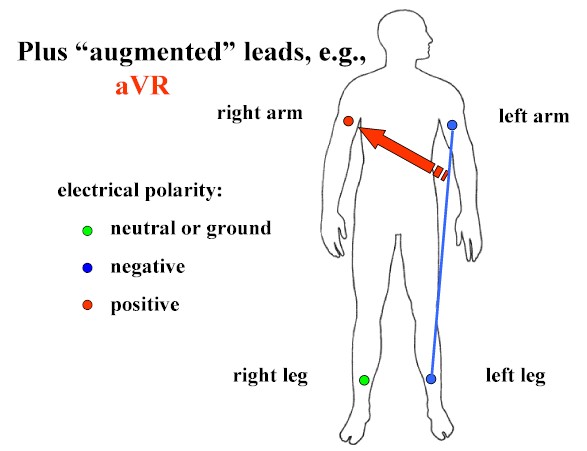
Measuring these leads would thus involve using a wire to connect different body parts (e.g., left arm and left leg), then holding that to the watch, while the other part (e.g., right arm) completes the circuit on the watch. I did not have wire handy and also wanted to simulate a situation where someone could be in a remote or inaccessible location (e.g., skiing, on a plane, etc.) where an Apple Watch is the only tool they have.
Measuring Precordial Leads, V1-V6:
We unfortunately must take an aside to discuss ECG theory because discussion of precordial leads is nonsense without exploring it. Leads I-III have easy to understand measurements, much like connecting a multimeter to the positive and negative end of an AA battery, there is a positive and negative electrode, and the difference in potential between them is easily measured. The precordial leads (V1-V6) overly the chest wall at 6 different positions, however they don’t have a clearly apparent second electrode. There is no actual second electrode, but instead a theoretical position deep in the chest (under the heart) known as Wilson’s Central Terminal to which the precordial leads are compared. That theoretical point obviously doesn’t have a lead placed on it but is approximated by averaging all the limb leads and treating that potential as the reference to which the precordial leads are compared against. It is assumed to be nearly zero and unchanging during the cardiac cycle.
The details and derivation of this are discussed in detail in a 1975 text, “Bioelectromagnetism: Principles and Applications of Bioelectric and Biomagnetic Fields” by Malmivuo and Plonsey, which is by far the best text on this subject that I have found. In section 15.3 of this text, the precordial leads specifically and Wilson’s Central Terminal are discussed.

Wilson, et. al, (1934). Electrocardiograms that represent the potential variations of a single electrode. American Heart Journal, 9(4), 447-458.
The original publications are in the American Heart Journal, whose volumes from 1932-1934 are archived online for free. In summary, Wilson’s Central Terminal cannot be faithfully created on an Apple Watch without connecting all of your limbs with copper wires and then connecting that to one of the Apple Watch electrodes. This is unwieldy and defeats the purpose of a portable, wearable ECG. However, there are means to approximate it which are effective. I found two approaches in the literature to this approximation:
- Using the right arm (wrist) as an approximation was the simplest approach, and was described and validated by a cardiologist in this 2019 publication
- Using the right arm (wrist) with the left wrist wrapped around it, as described in this 2019 publication by German cardiologists
- They called their precordial leads “Wilson-like” leads
- Their methodology involved only recording V1, V4 and V6 as recording more was cumbersome for patients (after measuring all 6 myself, I’m inclined to agree)
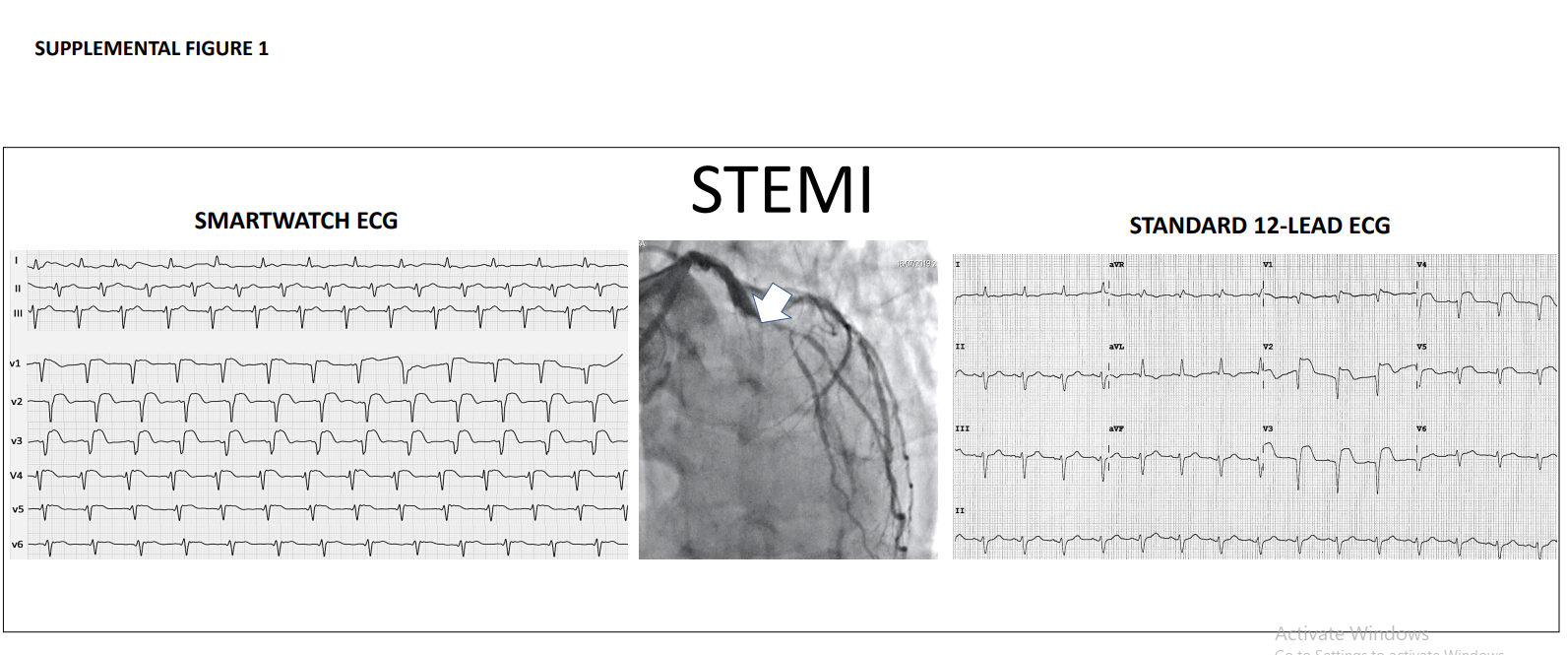
- Their methodology was tested on actual STEMI patients, and their Apple Watch ECGs were used by cardiologists to successfully identify not only infarct, but the location of the infarct (LAD).
For my own measurements, I was intrigued by the second approach, so I performed it by their methodology as follows:
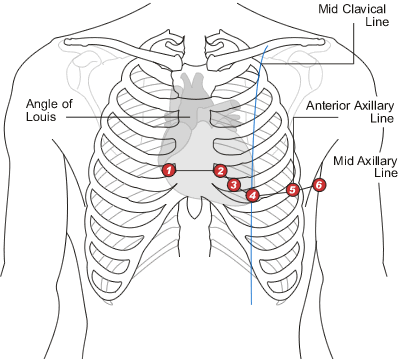
- V1: Watch on right 4th intercostal space (ICS), right index finger on crown with left hand wrapped around right wrist
- V2: Watch on left 4th ICS, right index finger on crown with left hand wrapped around right wrist
- V3: between V2 and V4
- V4: Watch on left 5th ICS, mid clavicular line, right index finger on crown with left hand wrapped around right wrist
- V5: Watch on left 5th ICS, anterior axillary line, right index finger on crown with left hand wrapped around right wrist
- V6: Watch on left 5th ICS, mid axillary line, right index finger on crown with left hand wrapped around right wrist
I would suggest following an image like this one if you plan to replicate this yourself.
My Own ECG:
Below is the monstrosity I spent the last 30 minutes recording, outputting as 9 separate PDFs, then stitching together in Photoshop. Of note, these are not simultaneous readings from each lead, but 9 discrete intervals recorded individually.
Brief overview of how this 9-lead ECG does and doesn’t provide more information than a 1-lead ECG:
- Rate:
- could be obtained on one lead
- Rhythm:
- likewise to above
- PR:
- The interval would be unchanged regardless of the number of leads but we do get new information with multiple views of the PR segment. Additional information about reciprocal changes has implications for ischemia and atrial morphology (e.g., Liu’s criteria for atrial infarct/ischemia, changes in V1 seen with right / left atrial enlargement which we now have access to on the precordial leads)
- QT:
- likewise to above
- Axis:
- lack of aVF would initially appear limiting, however I being positive and III being (roughly) isoelectric suggests my QRS axis is normal and something like +30 degrees. So the added leads do give us more information in yet another way.
- R-wave progression:
- Definitely not possible on a 1-lead ECG
- ST segments:
- Definitely not possible on a 1-lead ECG unless changes are only in lateral leads. My ST segments are visualized and lie on the baseline on every lead. I’m a bad patient as I am guessing I don’t have any current ischemia, and this ECG supports that (2024 update; I remain alive so I suspect that I was correct). In studies where patients have had actual ST segment elevations, MI patients have been followed with these sort of Apple Watch 6 or 9-lead recreations… they have routinely been detected!
Discussion:
Academics who have published on this topic have published interesting results such as using actual STEMI patients, comparing the Watch ECGs to professionally performed ones, as well as having actual cardiologists perform blind reads of ECGs to assess sensitivity and specificity. The results have consistently shown that the Apple Watch, while unwieldy, can perform largely accurate ECGs.
An undergraduate student’s December 2020 review article on this topic, “Einthoven and precordial lead accuracy of smartwatch-acquired electrocardiographs: a review of the literature”, can be found here. It is a great discussion of the underlying electrophysiology, successes, and limitations of this topic.
I think the most interesting cases are taking actual STEMI patients and seeing how accurately the Apple Watch could measure them. Out of Italy, this 2020 JAMA Cardiology article used Series 4 Apple Watch ECGs to record 100 patients (54 STEMIs, 27 NSTEMIs, 19 controls). In their supplemental materials, they included a comparison of a STEMI as perceived by the Apple Watch vs. their standard ECG equipment:
I think there is true utility to these, but only in very specific scenarios where access to medicine is forcibly delayed. If transit to a hospital is possible, then precious door-to-balloon time would be wasted as you place an Apple Watch in 9-12 various spots over your bare chest and arms. However, situations that come to mind are remote recreation (skiing, hiking), airplane travel, and catastrophe, where most owners of Apple Watches would be expected to have them on-hand, and there is a forced delay until emergency personnel can get you to a hospital / cath lab.
The natural follow up question to this is whether or not this hyper-early detection (not only pre-ED but pre-ambulance!) would actually change outcomes. I’m not sure I’m qualified to answer that. The impact of early ECGs on STEMI care has been explored in several studies, however those have been more directed at whether or not having paramedics perform ECGs pre-hospital will improve outcomes.
This article was last updated November 2024.